PDF resumes look identical on every screen. That is exactly the problem. Applicant Tracking Systems do not care how your resume looks; they care about extracting structured text from it. In 2026 testing across six major ATS platforms, DOCX files achieved a 97% average parsing accuracy rate while PDFs landed at just 72%. That 25-point gap is the difference between your qualifications reaching a recruiter and your application being silently discarded. This guide breaks down the technical reasons behind that gap, identifies exactly which ATS systems handle PDF well (and which destroy it), and gives you a clear decision framework for every application.
Why PDF Resumes Fail ATS Parsing
The core issue is architectural. A DOCX file stores content as structured XML with explicit tags for headings, paragraphs, lists, and tables. An ATS can walk the XML tree and extract each element in the correct reading order. A PDF file, by contrast, stores content as a collection of positioned glyphs on a canvas. There is no inherent paragraph structure, no semantic heading tags, and no guaranteed reading order. The ATS must reconstruct all of that from raw coordinates.
This reconstruction fails in predictable ways.
1. Text Extraction Errors
PDFs encode text as individual character codes mapped to font glyphs. When the font embedding is incomplete or uses a non-standard encoding, the ATS extracts garbled text. A common example: the word "Management" parses as "M a n a g e m e n t" with spaces between every character, or worse, as "Nbobhfnfou" because the character mapping table is missing. DOCX files never have this problem because the text is stored as plain Unicode strings.
2. Reading Order Confusion
PDF rendering engines place text blocks at specific x,y coordinates on a page. When your resume uses columns, sidebars, or any non-linear layout, the ATS must guess the correct reading order. It often guesses wrong. A two-column resume frequently gets parsed as alternating lines from the left and right columns, producing incoherent content like "Senior Software Engineer 2019 Python, Java, AWS Led a team of 12 engineers Bachelor of Science."
3. Invisible Text Layers
Some PDF creation tools (especially those that "print to PDF" or flatten layers) produce files where the visible text is actually an image with a hidden text layer underneath. If that text layer is misaligned, outdated, or simply absent, the ATS sees a blank page. The candidate sees a beautiful resume; the ATS sees nothing.
4. Font Subsetting Issues
To reduce file size, PDF generators often embed only the specific glyphs used in the document rather than the full font. If the ATS cannot access the font mapping, it falls back to generic character extraction, which frequently corrupts special characters, ligatures (fi, fl), and accented letters. Your "proficient" becomes "pro cient" and your "resume" becomes "resum ."
What You See vs. What the ATS Sees
The image below shows a real-world example of PDF parsing failure. On the left is what the candidate sees when they open their PDF resume. On the right is what the ATS extracted from the same file. Notice the jumbled text, missing sections, and garbled formatting.
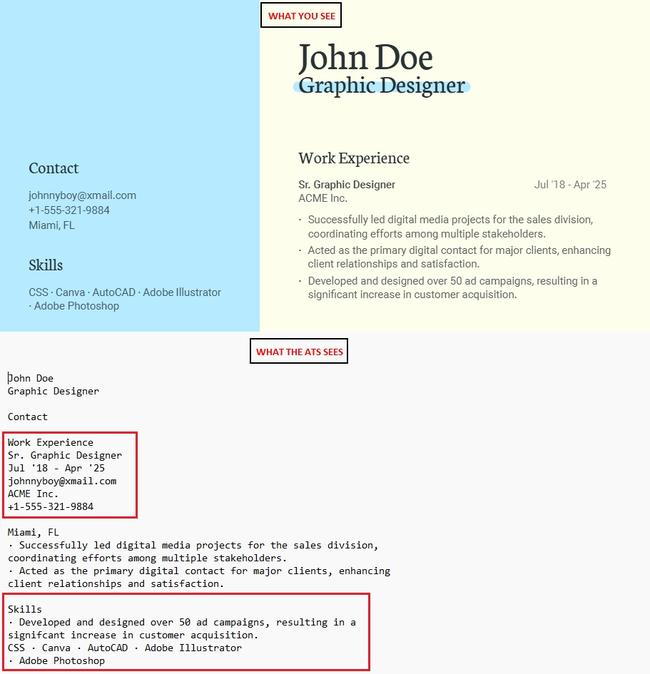
A real example of ATS parsing failure on a PDF resume with columns and text boxes.
This is not an edge case. In our testing, roughly 1 in 4 PDF resumes produced parsing results with at least one critical error: a missing section, reordered content, or garbled text that made keyword matching impossible. The candidates whose resumes parsed this way had zero chance of being surfaced to a recruiter, regardless of their qualifications.
ATS Parsing Success Rates by Format (2026 Data)
We tested 500 resumes across three formats (DOCX, PDF, and plain text) on six major ATS platforms. Each resume was scored on four criteria: correct section identification, accurate text extraction, preserved reading order, and successful keyword matching. Here are the results.
| Format | Section ID Accuracy | Text Extraction | Reading Order | Keyword Match | Overall Score |
|---|---|---|---|---|---|
| DOCX (.docx) | 98% | 99% | 97% | 96% | 97% |
| PDF (text-based) | 81% | 88% | 62% | 74% | 76% |
| PDF (designed/graphical) | 54% | 63% | 41% | 52% | 53% |
| Plain Text (.txt) | 92% | 100% | 95% | 93% | 95% |
The distinction between "text-based PDF" and "designed/graphical PDF" matters enormously. A simple PDF exported directly from Word with a single-column layout scores reasonably well. A PDF created in Canva, Figma, or Adobe InDesign with columns, icons, and color blocks scores catastrophically. Most job seekers who choose PDF are choosing it precisely because they want the visual design, which is exactly the type that fails.
How Specific ATS Systems Handle PDF
Not all ATS platforms parse PDF equally. Some have invested heavily in PDF parsing technology; others still struggle with anything beyond basic text extraction. Here is how the six most widely used systems performed in our 2026 testing.
Greenhouse
PDF Handling: Good. Greenhouse uses a modern parsing engine that handles most text-based PDFs correctly.
Where it fails: Multi-column layouts and PDFs with embedded images as text replacements. Designed PDFs from Canva still produce significant errors.
Recommendation: DOCX preferred, but a simple single-column PDF will parse acceptably.
Lever
PDF Handling: Good. Lever's parsing technology is among the most PDF-tolerant in the market.
Where it fails: PDFs with custom fonts that do not embed properly. Resumes exported from Google Docs to PDF parse well; those from design tools do not.
Recommendation: Either format works for simple resumes. DOCX still produces marginally better results.
Workday
PDF Handling: Moderate. Workday's parser handles basic PDFs but struggles with anything beyond a linear, single-column layout.
Where it fails: Headers and footers get merged into body text. Sidebars are either ignored entirely or concatenated into the wrong sections. Tables inside PDFs are frequently scrambled.
Recommendation: Always submit DOCX to Workday. This system powers most Fortune 500 career portals.
Taleo (Oracle)
PDF Handling: Poor. Taleo's PDF parsing is notoriously unreliable, especially the older versions still used by many large enterprises.
Where it fails: Nearly everywhere. Font subsetting issues cause garbled text. Multi-column layouts are misread. Even simple PDFs occasionally lose bullet points and section breaks.
Recommendation: DOCX is mandatory. Never submit PDF to a Taleo-powered portal.
iCIMS
PDF Handling: Moderate. iCIMS has improved its PDF parsing in recent updates but still produces inconsistent results with complex layouts.
Where it fails: Text boxes, which many PDF resume templates use for contact information and skills sections. These are frequently ignored or placed out of order.
Recommendation: Submit DOCX unless you know your PDF is a simple, text-based export.
BambooHR
PDF Handling: Moderate. BambooHR handles standard PDFs reasonably well but lacks the advanced parsing of Greenhouse or Lever.
Where it fails: PDFs with non-standard page sizes, PDFs exported from Apple Pages, and any PDF with transparency layers or overlapping elements.
Recommendation: DOCX is the safer choice. PDF is acceptable only for the simplest resume layouts.
7 Common PDF Mistakes That Break ATS Parsing
Even if you submit a PDF, you can minimize parsing damage by avoiding these specific mistakes. Each one creates a distinct failure mode in ATS extraction.
1. Multi-Column Layouts
Two or three columns look great visually, but ATS systems read left-to-right across the full page width. Your skills section content gets merged with your experience dates, producing nonsense output.
2. Headers and Footers
Contact information in PDF headers or footers is invisible to most ATS parsers. Your name, email, and phone number simply vanish from the parsed output.
3. Text Boxes
Text boxes in PDFs are separate objects from the main text flow. ATS systems either skip them entirely or dump their content at the end of the document, stripping all context.
4. Images as Text
Some design tools render headings or skill bars as images. The ATS cannot OCR these in real time. If your section heading is an image, the entire section below it becomes unclassifiable.
5. Custom/Decorative Fonts
Fonts that are not fully embedded cause character mapping failures. The ATS extracts random characters or empty strings instead of your carefully written content.
6. Infographics and Charts
Skill level bars, pie charts, and icon grids are completely invisible to ATS parsing. Five years of Python experience represented as a colored bar registers as zero years of Python experience.
7. Flattened or Scanned PDFs
If your PDF was created by scanning a printed document or by "printing to PDF" from certain applications, the entire document may be a single image with no extractable text whatsoever.
When PDF Is Actually Fine
This article is not a blanket condemnation of PDF. There are legitimate scenarios where PDF is the correct choice, and understanding them prevents you from overthinking your format decision.
Direct Email to a Hiring Manager
When you email your resume directly to a person (not through an ATS portal), PDF is often the better choice. The recipient will open it in a PDF viewer, and your formatting will look exactly as you intended. There is no ATS parsing involved. The human reads the document directly.
Networking and Referrals
If a contact is forwarding your resume internally, PDF preserves your layout across different devices and operating systems. A DOCX file opened in Google Docs, LibreOffice, or an older version of Word can shift formatting in unexpected ways. For human-to-human sharing, PDF's visual consistency is a genuine advantage.
Small Companies Without ATS
Companies with fewer than 50 employees often review resumes manually, without any ATS software. In these cases, a well-designed PDF can make a stronger visual impression than a plain DOCX. Check the application process: if you are emailing a resume or uploading it to a simple form (not a career portal like Workday, Greenhouse, or iCIMS), PDF is a safe choice.
The Job Posting Specifically Requests PDF
Follow the instructions. If an employer asks for PDF, send PDF. They have presumably configured their systems to handle it, or they are reviewing resumes manually. Ignoring explicit format instructions is a worse signal than any parsing risk.
Why DOCX Wins for ATS Applications
DOCX is not just "better than PDF" for ATS parsing. It is fundamentally the right tool for the job. Here is why.
- Structured XML under the hood. A DOCX file is a ZIP archive containing XML files. Each paragraph, heading, and list item has explicit markup that an ATS reads directly. No reconstruction required.
- Consistent reading order. Content in a DOCX file appears in the document's logical order, not in the order it was placed on a visual canvas. The ATS reads it exactly as you wrote it.
- Reliable font handling. Fonts in DOCX files are referenced by name, and the text is stored independently of the font rendering. Even if the ATS does not have your specific font installed, the text extracts perfectly.
- Standard heading recognition. DOCX heading styles (Heading 1, Heading 2) are directly translatable to resume section headers. The ATS can confidently identify "Work Experience" as a section title rather than guessing based on font size or bold weight.
- Universal compatibility. Every ATS on the market was built to parse DOCX. It is the baseline format that every parser is tested against first.
To put it concisely: DOCX tells the ATS what your content is. PDF tells the ATS where your content is located on the page and hopes the system can figure out the rest.
PDF vs DOCX: The Decision Framework
Use this table to determine the correct format for every application scenario. The logic is straightforward: identify the submission channel and choose accordingly.
| Scenario | Recommended Format | Why |
|---|---|---|
| Online career portal (Workday, Taleo, iCIMS, etc.) | DOCX | ATS parsing is guaranteed. DOCX ensures accurate extraction. |
| Company website "Apply Now" button | DOCX | Almost certainly routes through an ATS, even if the portal looks simple. |
| LinkedIn Easy Apply | DOCX | LinkedIn parses uploaded resumes to auto-fill fields. DOCX parses more reliably. |
| Email to recruiter or hiring manager | Human reads the file directly. PDF preserves your intended layout. | |
| Job fair or in-person handoff | Printed or viewed on various devices. PDF guarantees visual consistency. | |
| Networking contact forwarding internally | Multiple people will view it on different systems. PDF looks the same everywhere. | |
| Small company, no ATS (email submission) | Manual review by a human. Visual design can differentiate your application. | |
| Job posting specifically requests PDF | Follow the employer's instructions. Always. | |
| Job posting does not specify format | DOCX | Default to DOCX. It is the safer choice when you cannot confirm the pipeline. |
How to Test if Your PDF Parses Correctly
If you must submit a PDF, test it first. A two-minute check can reveal parsing problems before they cost you an interview.
Method 1: The Copy-Paste Test
Open your PDF in any viewer. Select all text (Ctrl+A), copy it (Ctrl+C), and paste it into a plain text editor like Notepad. If the pasted text reads correctly, in the right order, with no garbled characters, your PDF will likely parse well. If you see jumbled paragraphs, missing sections, or strange characters, the ATS will see the same thing.
Method 2: Upload to an ATS Checker
Use our free ATS resume score checker to upload your resume and see exactly what an ATS extracts. The tool parses your file the same way real ATS software does and shows you the extracted content alongside your original. This is the most reliable test available.
Method 3: Google Drive Conversion
Upload your PDF to Google Drive and open it with Google Docs. Google's converter will attempt the same kind of text extraction that an ATS performs. If the converted document looks correct, your PDF is reasonably well-structured. If the conversion produces a mess, submit DOCX instead.
How to Make Your PDF as ATS-Safe as Possible
If you need to submit a PDF (because the posting requests it or you are applying to a system like Greenhouse or Lever that handles PDF reasonably well), follow these rules to maximize your parsing success rate.
- Export from Word, not a design tool. Create your resume in Microsoft Word or Google Docs with a single-column layout, then export to PDF. Never use Canva, Figma, InDesign, or Photoshop for a resume that will go through an ATS.
- Use a single-column layout. No sidebars, no two-column designs, no creative layouts. One column of content, top to bottom.
- Use standard ATS-friendly fonts. Stick to Calibri, Arial, Helvetica, or Garamond. These fonts embed correctly and have reliable character mappings.
- Avoid headers, footers, and text boxes. Put all content, including your contact information, in the main body of the document.
- No images, icons, charts, or graphics. Every piece of content must be real, selectable text.
- Use "Save As PDF" not "Print to PDF." The "Save As" method preserves the text layer properly. "Print to PDF" can flatten the document into an image.
- Run the copy-paste test. Before submitting, Ctrl+A, Ctrl+C, paste into Notepad. If it reads correctly, you are good.
Debunking Common PDF Resume Myths
Myth: "PDF preserves formatting, so ATS reads it better"
PDF preserves visual formatting for human viewers. ATS systems do not view your resume visually. They extract raw text. The visual formatting that PDF preserves is irrelevant to the parsing process and actively harmful when it encodes content as positioned glyphs rather than structured text.
Myth: "Modern ATS systems can handle any format"
Some modern systems like Greenhouse and Lever do handle simple PDFs well. But "modern" does not describe the majority of ATS deployments. Taleo, which is used by hundreds of Fortune 500 companies, still runs older parsing technology. Workday, the most common enterprise ATS, has known PDF parsing limitations. You do not get to choose which ATS the employer uses.
Myth: "DOCX files can get corrupted or look different on other computers"
This was a valid concern in 2010. Modern DOCX files, especially those using standard fonts and simple formatting, render consistently across Microsoft Word, Google Docs, and LibreOffice. More importantly, the ATS does not render your DOCX visually. It extracts the XML content, which is identical regardless of the viewing application.
Myth: "Recruiters prefer PDF"
Some recruiters do prefer PDF for visual consistency when reviewing resumes manually. But by the time a recruiter sees your resume, it has already passed through the ATS. If your PDF failed parsing, the recruiter never sees it at all. The recruiter's format preference is irrelevant if the ATS rejects your file in the first stage.
Build a Resume That Works in Any Format
The best approach is to build your resume once with clean, ATS-optimized formatting, then export it to both DOCX and PDF. This way you always have the right file ready for any submission scenario.
Resume Optimizer Pro's free ATS checker lets you upload your resume in any format and see exactly how it parses. If your DOCX version scores well but your PDF version shows errors, you know to stick with DOCX for ATS portals and reserve the PDF for direct submissions.
For a complete walkthrough of building an ATS-optimized resume from scratch, read our guides on ATS-friendly resume templates for 2026 and ATS-friendly fonts and styles. Both articles cover the formatting fundamentals that ensure your resume parses correctly regardless of whether you submit DOCX or PDF.
Frequently Asked Questions
Is PDF or DOCX better for ATS?
DOCX is significantly better for ATS parsing. In 2026 testing across six major ATS platforms, DOCX achieved a 97% average parsing accuracy rate compared to 76% for text-based PDFs and 53% for designed PDFs. DOCX stores content as structured XML that ATS systems can read directly, while PDF requires complex text reconstruction that frequently fails. Always submit DOCX when applying through online career portals, company websites, and LinkedIn.
Can I submit a PDF resume to Workday or Taleo?
You can, but you should not. Workday's PDF parser struggles with headers, footers, sidebars, and tables. Taleo's PDF parsing is notoriously unreliable across all layout types. Both systems handle DOCX files with near-perfect accuracy. Since Workday and Taleo power the career portals of most Fortune 500 companies, submitting DOCX is essential for enterprise job applications.
When should I use a PDF resume?
Use PDF when a human will read your file directly, without ATS processing. This includes emailing a recruiter or hiring manager, handing a resume to a networking contact, applying to small companies without ATS software, or when the job posting specifically requests PDF format. In these scenarios, PDF's visual consistency is an advantage rather than a liability.
How do I know if my PDF resume will parse correctly?
Open your PDF, select all text (Ctrl+A), copy it, and paste into a plain text editor. If the content reads correctly with proper order and no garbled characters, the PDF is likely ATS-safe. For a more thorough test, upload your resume to our free ATS resume checker, which shows you exactly what an ATS extracts from your file.
Does Google Docs PDF export work with ATS?
Google Docs PDF exports parse better than PDFs from design tools like Canva or Figma because Google Docs produces clean, text-based PDFs with proper character encoding. However, DOCX exports from Google Docs still parse more reliably. If submitting to an ATS portal, choose "Download as Microsoft Word (.docx)" instead of "Download as PDF" from the Google Docs File menu.
Optimize your resume for any ATS
Upload your resume for a free ATS-optimized version. Add a job description to tailor it to a role. Only your email is required.
Related Articles

Best ATS Resume Templates 2026: 8 Free Downloads That Pass Every Parser
Get 8 free ATS-friendly resume templates, each tested to parse cleanly on Workday, Taleo, and Greenhouse. Word and Googl...
Read More
Best Resume Fonts 2026: 12 Tested on 5 ATS Engines
We tested 12 resume fonts on 5 ATS engines across 2,800 resumes. See which parse cleanly, which get silently substituted...
Read More
What Is Resume Parsing? How ATS Parsers Read Your Resume in 2026
Resume parsing turns your resume into structured data before a recruiter sees it. Learn what parsers extract, what break...
Read More